Welcome New Clients!
Before scheduling your appointment, we would like to share all the services we offer and how you can receive them every 6 weeks.
IMPORTANT NOTE: If you must miss your appointment, email us at clientinfo@streetwisegeorgia.org, or call 678-985-9915 at least 48 hours in advance—so another family can receive the help they need. If you do not cancel your appointment, you will lose all StreetWise services, including our Mobile Food Pantry, for 12 weeks. Schedule an appointment today!
-
Support
Your first visit will include filling out paperwork along with a brief interview with one of our Client Advisors. They will help provide and/or refer services you are qualified to receive based on the information you provide. Reminder: please bring all of your documentation (see FAQs for details).
-
Groceries
You will be receiving a large amount of food! Several boxes with an estimated total of 200 pounds with a value of $700 providing a substantial amount of food including meat, fresh produce, cereal, water, canned food, pasta, snacks, and more. So make sure your trunk is empty and ready to be loaded by our friendly team of volunteers!
-
Heaven's Grocery Store
Many families rely on SNAP or WIC, but those programs don’t cover essentials like cleaning supplies, vitamins, baby items, or hygiene products. Heaven’s Grocery Store lets clients choose what their families need most. Only the registered client may shop, and item limits apply.
-
Cedar’s Closet
Take a visit to our Cedar’s Closet for new and gently used clothes and shoes with sized and styles for all ages. Our personal shoppers are there to help you find everything you need.
-
Working Family Pantry Program
We offer an evening program designed for clients who work during weekday hours. You’ll receive the same services as weekday families, including Cedar’s Closet, Heaven’s Grocery Store, and multiple boxes of food. Proof of employment is required.
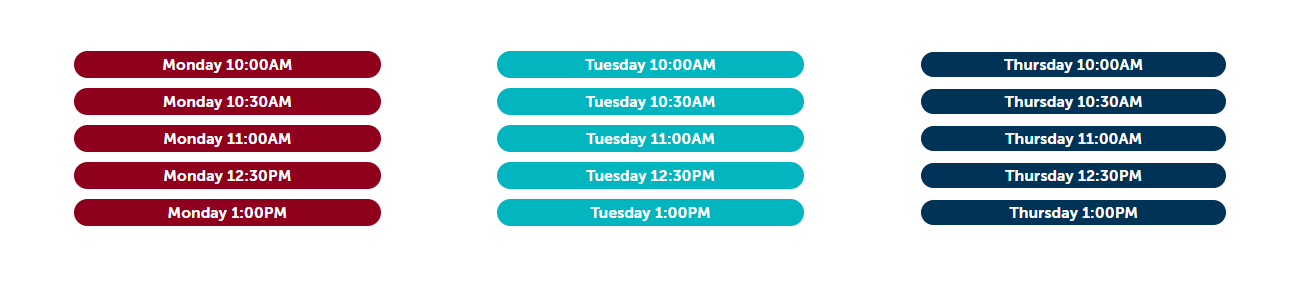
Use the buttons below to schedule an appointment for 2027!
New to scheduling with us? Create an Acuity account when you book, and we’ll save your information so you can book faster next time.
Are you a returning client with an account from 2025? Head Here
Didn’t see the time you wanted? Please choose another day or time below to find our next available appointment. Full instructions on how to book are below.
How to book your appointment
Under Appointment Types, choose the one that fits you (for example, New Weekday Client). Scroll down and click the day and time you would like.
A calendar of dates for that time will appear.
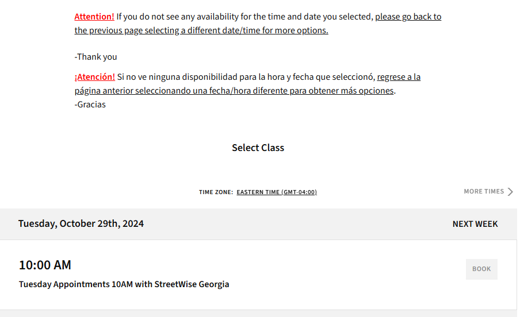
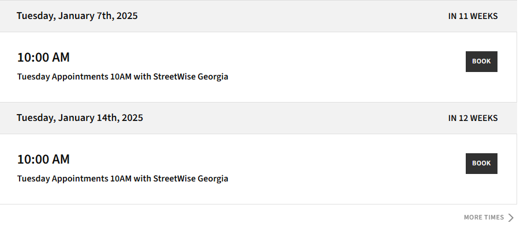
Scroll until you find an open date. Available dates have a dark grey BOOK button. If you don’t see any openings, go back and choose a different day or time.
Example: if you see no openings, go back and pick another day or time
Example: open dates have a
dark black BOOK button
Click BOOK and fill out the form completely.
Create an account and set a password.
After you book, please sign up for an account with a password.
Next time, just log in, and your information will already be filled in, so you will not have to re-enter your whole application every time you book.
Watch for your confirmation email. It tells you what to bring and has a button to cancel or change your appointment.