Mobile Food Pantry
This drive-thru style event occurs Saturday, January 9th, by appointment only. This is not a delivery service; this is for on-site pick-up only.
Registration begins 2 weeks before the event!
This Food Pantry is a drive-thru weekend program held every second Saturday of the month, designed to provide food to our neighbor families, at no cost, while they never leave their car. Our goal is to help families and individuals who are struggling to make ends meet by providing them with nutritious food to help bring relief to their budget.
At the event, you can expect to be given a wide variety of fresh produce, meat, water, bakery items, and more, so please come with an empty trunk. Be prepared to show a valid photo I.D. at check-in.
If you are a Weekday or Working Family Pantry Night client and have an appointment 2 weeks before or 2 weeks after this Mobile Food Pantry, you are not eligible for this event and your spot will be cancelled.
Did you know someone else can pick up for you as long as they show a copy of your valid I.D.? Please send us a message at least 48 hours before your appointment, including the person’s first and last name, so that we can expect them!
IMPORTANT NOTE: If you must miss your appointment, use the buttons at the bottom of your confirmation email, email us at clientinfo@streetwisegeorgia.org, or call 678-985-9915 at least 48 hours in advance—so another family can receive the help they need. If you do not cancel your appointment, you will lose all StreetWise services, including our Mobile Food Pantry, for 12 weeks. Schedule an appointment today!
Don’t see the time that you wanted? Please choose another time below to find our next available appointment time.
Full instructions on how to book are below.

How to book your appointment
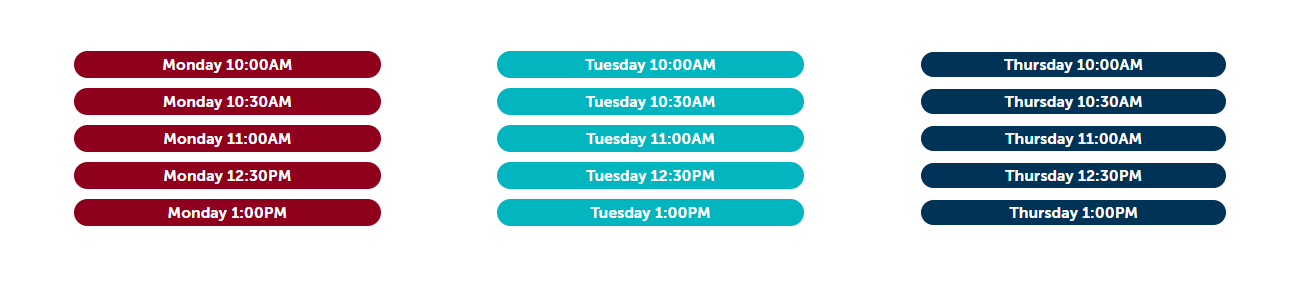
Under Appointment Types, choose the one that fits you (for example, Mobile Food Pantry). Scroll down and click the day and time you would like.
Example: choose a day and time
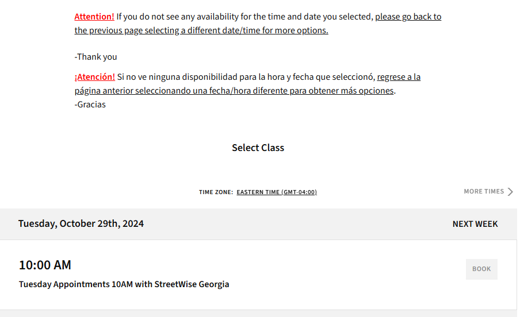
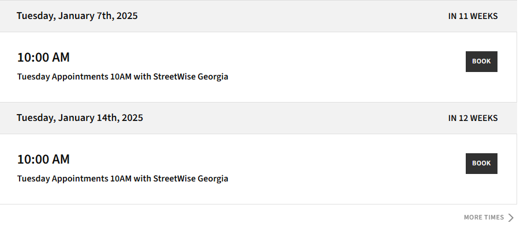
A calendar of dates for that time will appear. Scroll until you find an open date. Available dates have a dark grey BOOK button. If you don’t see any openings, go back and choose a different day or time.
Example: if you see no openings, go back and pick another day or time
Example: open dates have a dark grey BOOK button
Click BOOK and fill out the form completely.
Create an account and set a password.
After you book, please sign up for an account with a password. Next time, just log in, and your information will already be filled in, so you will not have to re-enter your whole application every time you book.
Watch for your confirmation email. It tells you what to bring and has a button to cancel or change your appointment.